✓ Live video and audio.
Clear, low-latency. Audio quality is prioritized over video, so even on a slower connection you can still hear pronunciation properly.

Your French classroom. Zero setup.
Just click, connect, and learn—no downloads, no apps, no tech headaches.
Everything you need lives right here in your browser.
The same classroom hosts every kind of lesson I teach — general French, conversation practice, pronunciation work, professional French for working adults. Whichever you’re booked for, the tools are the same.
A lesson lasts 30, 45, or 60 minutes. Shortly before we start, I send you a link by email. At the agreed time, you click it, allow your browser to use your microphone and camera, and we're together.
We say bonjour, talk a bit about your week, then move into what we'd planned — a grammar point, a conversation, some vocabulary you wanted to work on. We use the shared whiteboard to write things down, list new words, and work through exercises together. When something needs correcting, I correct it gently. When you're searching for a word, I help you find it.
After the lesson, I send you a short piece of homework and a manual covering what we worked on, so you have something to come back to before the next time.

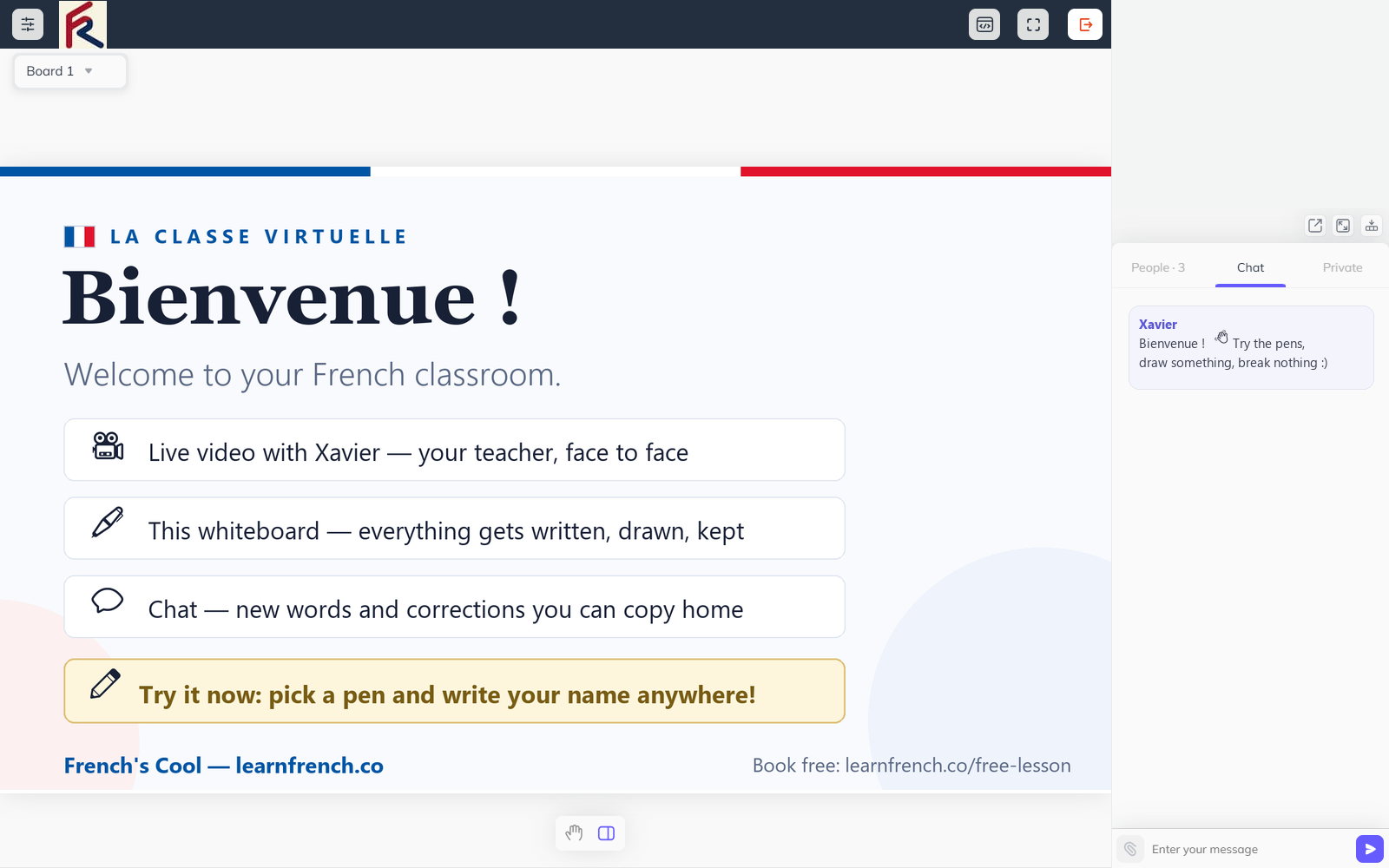
Like pages of a notebook: grammar on one board, vocabulary on another. Nothing is erased until you say so.
The heart of the lesson. Every new word, correction and example is written here live — and you can write too.
Xavier face to face, in HD. Camera optional if you are shy — the voice is what matters.
Lessons are one-to-one or small groups — see who is in the room with you.
New words typed out so you never mis-hear them. Copy the whole chat home after class — free revision notes.
Screen, slides, PDFs, audio, video — straight onto the board when the lesson needs it.
Classroom manners, built in. Plus layouts that switch between board, video or both.
Tap the markers to explore the room — or walk straight in below.
Clear, low-latency. Audio quality is prioritized over video, so even on a slower connection you can still hear pronunciation properly.
I write on it, you write on it, we both see the same canvas in real time. This is where most of the actual teaching happens.
For quick translations, links, words to remember, or short notes I want you to keep.
If you'd like, the lesson is recorded and saved to your private dashboard for later review. Always your choice, never automatic.
How lessons work
The whiteboard is the single most useful tool in the classroom. A few examples of what we actually do with it.
Whichever lessons you’re booked for, the whiteboard saves automatically to your dashboard after each session. Print it, download it, or just revisit it before your next lesson.
Practical stuff. Most students already have all of this :
● A laptop, tablet, or phone with a modern browser (Chrome, Safari, Firefox, or Edge all work fine)
● A regular internet connection — 5 Mbps download / 1 Mbps upload is more than enough
● A quiet-ish space where you can speak without interruption
● Headphones if you have them — they make audio clearer, but they're not required
● A webcam — recommended but not strictly required if you'd prefer audio only
If your microphone or camera doesn't cooperate, we'll sort it out in the first few minutes of your trial lesson. It's almost always a one-click browser permission issue.
Everything that happens in the classroom is between you and me:
● the session is fully encrypted by LiveClass, using the highest industry standard procedures and protocols.
● Recordings (if you choose to use them) are stored in your private dashboard and not accessible to anyone else
● I never share lesson content, recordings, homework, or notes with third parties
● You can request deletion of any recording or saved material at any time, no questions asked
● I follow GDPR-standard data handling for everything tied to your account
I take this seriously — especially for professional students whose lessons may include sensitive work materials. If you'd ever rather not have something saved, just say so before the lesson starts.
It's almost always a browser permission setting — usually a single click to fix. I'll help you sort it out at the start of your trial lesson.
Yes. The interface is touch-friendly. Many students do quick weekday lessons from their phones and longer weekend sessions from a laptop.
Yes. Your account works from any device. You can log in from your laptop on Monday and your tablet on Thursday — same dashboard, same materials, no setup needed.
The classroom is built to recover. Audio and the whiteboard are prioritized over video, so if bandwidth gets tight you'll still hear me and see what I'm writing. If the connection drops completely, just refresh the page and rejoin — your session resumes where it stopped.
Yes. Whiteboards from every lesson are saved to your dashboard. You can download them as PDF or PNG to print, share, or review on your own.
No. The classroom is entirely browser-based — no installs, no separate apps, no extra accounts. You just need a modern browser (Chrome, Safari, Firefox, or Edge) and you're set.
No. Each lesson session is private between you and me. Recordings (if you opt in) and saved whiteboards live in your personal dashboard, accessible only by you. I never share lesson content with other students or anyone outside our sessions.
Life happens—we get it! If you need to miss a lesson, just let me know at least 24 hours in advance and we'll reschedule at no cost. For last-minute emergencies (illness, travel delays, etc.), message me as soon as you can and I'll do my best to accommodate you. No-shows without notice: To keep things fair for everyone, missed lessons without prior notice are counted as used. But I'm always happy to work with you if something unexpected comes up—communication is key!
Right now, I specialize in 1-on-1 lessons because personalized attention helps you progress faster. We focus 100% on your goals, pace, and challenges—no waiting for others to catch up. Thinking about learning with a friend or colleague? I occasionally open small group slots (2-4 people) for friends, couples, or coworkers. If you're interested, just mention it when you book—we can design a custom session!👥
Payments: Securely processed via Stripe/PayPal. You can pay per lesson or buy a package (5 or 10 sessions) for a small discount. 🔹 Receipts: Need one for work or reimbursement? Just ask—I'll send a detailed invoice right after payment. 🔹 Cancellations: Reschedule or cancel free of charge up to 24 hours before your lesson. After that, the session is considered used (unless it's a true emergency—just message me!). 🔹 No surprises: All pricing is transparent. No hidden fees, no auto-renewals unless you choose a subscription.
The easiest way to know if the classroom works for you is to spend thirty minutes in it.
The layout is designed to adapt to a wide variety of content types and organizational needs.
Consistent patterns and accessible interactions help create a stable and trustworthy experience.